

Medical Terminology Daily - Est. 2012

Medical Terminology Daily (MTD) is a blog sponsored by Clinical Anatomy Associates, Inc. as a service to the medical community. We post anatomical, medical or surgical terms, their meaning and usage, as well as biographical notes on anatomists, surgeons, and researchers through the ages. Be warned that some of the images used depict human anatomical specimens.

You are welcome to submit questions and suggestions using our "Contact Us" form. The information on this blog follows the terms on our "Privacy and Security Statement" and cannot be construed as medical guidance or instructions for treatment.


We have 501 guests online


A Moment in History

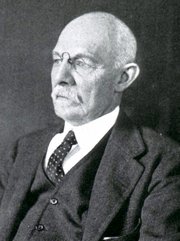
William S. Halsted, MD

William S. Halsted, MD
(1852 – 1922)

American anatomist, teacher, and surgeon, William Stewart Halsted was born in New York City, USA to a wealthy family of English origin. His father was involved in charitable work and Governor and trustee to a city hospital. Not a brilliant student initially, Halsted took an undergraduate in Liberal Arts in Yale, CT., after which he entered the Medical College of Physicians at the Columbia College, where he excelled.

As a second-year medical student Halsted applied and obtained a position in surgery at a local hospital. In here he learned about Lister’s antiseptic technique and became an adamant proponent of it to reduce infection. In 1877 Halsted obtained his MD. After a short time as House Physician at the New York Hospital, Halsted traveled to Europe to further his education studying for two years at the Universities of Vienna, Leipzig, and W?rzburg.

Besides being at the forefront of surgical and antiseptic techniques (introducing the use of rubber gloves in surgery), Halsted was extremely concerned with the way medical students were taught in the US. He pioneered bedside clinical round discussions with the medical students after two years of basic sciences studies. Halsted developed the idea of a patient chart; he also developed the residency program for medical students in use today.

Halsted is probably the most influential researcher and surgeon at the turn of the century. He dedicated time to the study of intestinal anastomoses and the use of silk as a suture material. His experimental work in 1887 proved that the inclusion of the submucosa layer in an anastomosis was mandatory, as well that a single layered anastomosis was enough to attain closure. Perhaps Halsted’s most important contribution was the application and use of the scientific method to surgical questions. Halsted’s principles, also known as  "Halsted's Rules of Surgery", set the standards used today in surgical suturing and surgical stapling.

He also pioneered the development and surgical techniques for radical mastectomy as a treatment for breast cancer.

As a side effect of this studied in anesthesia and the use of cocaine for anesthesia, Halsted became addicted to this substance, a problem that followed him through the years. Without impairing his capacity as a researcher and a surgeon, Halsted eventually recovered. He died in Baltimore in 1922 as a complication to surgery.

Sources:
1. Dubay, A. D., & Franz, G. M. (2003). Acute Wound Healing: The Biology of Acute Wound Failure. Surg Clin NA, 83, 463-481.
2. Halsted, W. S. (1887). Circular Suture of the Intestine - An Experimental Study. Am J Med Sci, 436-461.
3. “William Stewart Halsted: his life and contributions to surgery” Osborne, P. Lancet Oncol 2007; 8: 256–65
4. “William Stewart Halsted: Surgical pioneer” Burress, P Endoc Today (2010), 8: (2) 22
5. “William Stewart Halsted (1852–1922) Neurological stamp” Haas, LF J Neurol Neurosurg Psych 2000;69:641
Original image courtesy of "Images from the History of Medicine" at  www.nih.gov


 "Clinical Anatomy Associates, Inc., and the contributors of "Medical Terminology Daily" wish to thank all individuals who donate their bodies and tissues for the advancement of education and research”.

Click here for more information


bookplateink.com


How to set  a YouTube video closed caption (CC) in another language

  1. Start playing the video
  2. Click the closed caption icon [CC]. It will start the CC in English
  3. Click the Settings icon [⚙️] (gear)
  4. In the menu, select “Subtitles/CC” and click on [English (auto-generated) >]
  5. In the menu, click on [Auto-translate]
  6. Scroll down to the language you desire and click on it. The closed caption language will change.
  7. Using the time slide bar, go to the beginning of the video. 

Cómo configurar los subtítulos de un video de YouTube en otro idioma

  1. Reproduce el video
  2. Haz clic en el ícono de Subtítulos [C]. Se mostrarán los subtítulos en Inglés
  3. Haz clic en el ícono de Configuración [⚙️] (engranaje)
  4. En el menú, selecciona "Subtítulos (1)" y haz clic en [Inglés (generado automáticamente) >]
  5. En el menú, haz clic en [Traducción automática]
  6. Desplázate hacia abajo hasta el idioma que desees y haz clic en él. El idioma de los subtítulos cambiará.
  7. Usa la barra de tiempo para ir al principio del video.

Como ativar as legendas ocultas (CC) de um vídeo do YouTube em outro idioma


  1. Comece a reproduzir o vídeo
  2. Clique no ícone de Legendas/legendas ocultas [C]. Isso iniciará as legendas em inglês
  3. Clique no ícone de Configurações [⚙️] (engrenagem)
  4. No menu, selecione “Legendas/CC (1)” e clique em [Inglês (gerada automaticamente) >]
  5. No menu, clique em [Tradução automática]
  6. Role para baixo até o idioma desejado e clique nele. O idioma das legendas ocultas será alterado.
  7. Usando a barra de rolagem de tempo, vá para o início do vídeo.

 Come impostare i sottotitoli (CC) di un video di YouTube in un'altra lingua

  1. Avvia la riproduzione del video
  2. Fai clic sull'icona dei Sottotitoli/sottolitoli codificati [C]. Verranno visualizzati i sottotitoli in inglese.
  3. Fai clic sull'icona delle Impostazioni [⚙️] (ingranagio)
  4. Nel menu, seleziona "Sottotitoli (1)" e fai clic su [Inglese (generati automaticamente) >]
  5. Nel menu, fai clic su [Traduzione automatica]
  6. Scorri verso il basso fino alla lingua desiderata e fai clic su di essa. La lingua dei sottotitoli cambierà.
  7. Utilizzando la barra di scorrimento temporale, vai all'inizio del video.